Category Theory "formalizes mathematical structure and its concepts in terms of a collection of objects and of arrows (also called morphisms). A category has two basic properties: the ability to compose the arrows associatively and the existence of an identity arrow for each object. The language of category theory has been used to formalize concepts of other high-level abstractions such as sets, rings, and groups."
The Algebraic Query Language (AQL) tool and language implement some of the basic concepts of Category Theory. I have written initial versions of a loader that reads AQL content into Xholon, and an exporter that writes a Xholon app in AQL format, in order to explore similarities and differences between Xholon, AQL, and Category Theory. I am also finding AQL useful as a concrete tool to help me learn about Category Theory, in conjunction with reading various texts.
The examples included on this page are a few initial tests, mostly based on examples supplied within the AQL tool. They demonstrate that the structures in Xholon and AQL are roughly aligned with each other. I am just beginning to learn about Category Theory and how I might be able to use it with Xholon, and there's still a lot of work to do.
Test01 is a simple test. It reads the AQL content, generates a Xholon structure, and exports the generated Xholon structure in XML, YAML, SQL, and Graphviz Dot format. It also uses Graphviz itself to generate and display an SVG image. The Test01 source code is here.
Finance Colim is part of a larger AQL example. I've included 2 separate groups of AQL typeside, schema, and instance blocks. It's source code is here.
You can paste your own AQL typeside/schema/instance content into a Template, where it says "// paste your AQL code here". Run it by clicking one of the three "Run" buttons at the top of the Template web page, for example the "clsc" button. Note that for now Xholon only accepts a subset of AQL syntax. For example, each instance equation must be on its own line.
Other Xholon workbooks related to Category Theory are listed as part of this long list. Search for "Category" and "Categorical".
Step 1: Open the Template page.
Step 2: Paste the following AQL content into the Template page, just after where it says "// paste your AQL code here".
typeside Ty = literal {
  types
    int
    string
  constants
    Ken Licorice : string
    4 : int
}

schema S = literal : Ty {
  entities
    One
    Two
    Three
  foreign_keys
    fk1 : One -> Two
    fk2 : Two -> Three
  attributes
    attr1 : One -> int
    attr2 : Two -> string
    attr3 : Three -> string
}

instance I = literal : S {
  generators
    one1 : One
    one2 : One
    two1 : Two
    three1 : Three
  equations
    one1.attr1 = 4
    one1.fk1 = two1
    two1.attr2 = Ken
    two1.fk2 = three1
    three1.attr3 = Licorice
}
Step 3: Click the "clsc" button at the top of the Template page. The run-time page should open up, and you should see XML, YAML, SQL, and Graphviz content in tabs, and you should also see an SVG image.
Step 1: Open the page for the simple Ping Pong app.
Step 2: Locate the "PingPongSystem" node in the tree (Application > Model > CompositeStructureHierarchy > PingPongSystem).
Step 3: Right-click the "PingPongSystem" node, and select Export > nosql > CatAql .
Step 4: Click "doExport". Something like the following text should be generated in a tab on the page.
/*
To view this file, download the FQL tool (AQL) from http://categoricaldata.net/aql.html.
Automatically generated by Xholon version 0.9.1, using Xholon2CatAql.java
Wed Jun 14 12:16:00 GMT-400 2017 1497456960453
model: Ping Pong
www.primordion.com/Xholon
*/
typeside Ty = literal {
  java_types
    string = "java.lang.String"
    int = "java.lang.Integer"
    float = "java.lang.Float"
    double = "java.lang.Double"
    boolean = "java.lang.Boolean"
  java_constants
    string = "return input[0]"
    int = "return java.lang.Integer.parseInt(input[0])"
    float = "return java.lang.Float.parseFloat(input[0])"
    double = "return java.lang.Double.parseDouble(input[0])"
    boolean = "return java.lang.Boolean.parseBoolean(input[0])"
  java_functions
    plus : int,int -> int = "return (input[0] + input[1]).intValue()"
    plusf : float,float -> float = "return input[0] + input[1]"
    plusd : double,double -> double = "return input[0] + input[1]"
}

schema S = literal : Ty {
  entities
    PingPongSystem
    PingPongEntity
  foreign_keys
    pingPongEntity_port0 : PingPongEntity -> PingPongEntity
    pingPongEntity_parent : PingPongEntity -> PingPongSystem
  path_equations
    // If you run this with the AQL tool, and if the content includes infinite paths, then you may need to add one or more path_equations to prevent an error.
    // For example: hello_port0.world_port0 = Hello
  attributes
  observation_equations
  options
}

instance I = literal : S {
  generators
    pingPongSystem_0 : PingPongSystem
    pingPongEntity_1 : PingPongEntity
    pingPongEntity_2 : PingPongEntity
  equations
    pingPongEntity_port0(pingPongEntity_1) = pingPongEntity_2
    pingPongEntity_parent(pingPongEntity_1) = pingPongSystem_0
    pingPongEntity_port0(pingPongEntity_2) = pingPongEntity_1
    pingPongEntity_parent(pingPongEntity_2) = pingPongSystem_0
  options
}
Step 5a: You can load this text into the AQL tool, and press "Run".
Step 5b: You can also test it using the AQL in-browser tool.
Some examples of AQL, XML, YAML, SQL, Graphviz, SVG, and other generated content, are available here.
Xholon is primarily focused on building executable applications. Any Xholon node (AQL instance) may have one or more JavaScript behaviors. For example, you can add the following behavior to print out a sentence about each instance. To do this, right-click the "CatTheoryInstance" node in the Xholon tree, and select "XholonConsole". A console window will open up in a tab on the page. Paste the following behavior script into the console. Click "Submit". Look at the "out" tab to see the result.
<script><![CDATA[
var me;
var beh = {
  postConfigure: function() {
    me = this.cnode.parent();
    this.cnode.remove();
    var instance = me.first();
    while (instance) {
      me.println(instance.role() + " is a " + instance.schema.role() + ".");
      instance = instance.next();
    }
  }
}
]]></script>
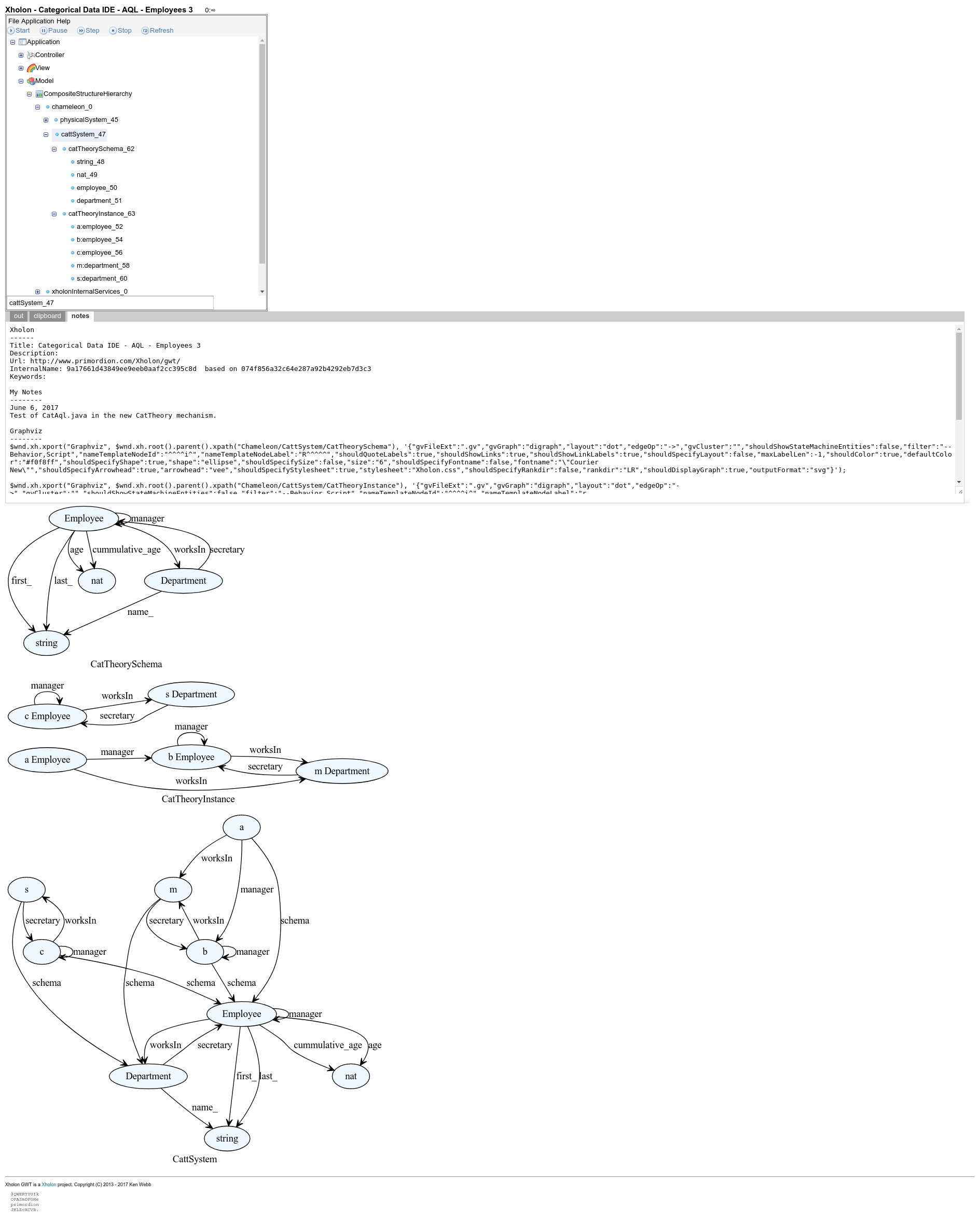
The following screenprint shows the AQL Employee/Department example after importing it into Xholon. It includes three separate SVG images generated using Graphviz.
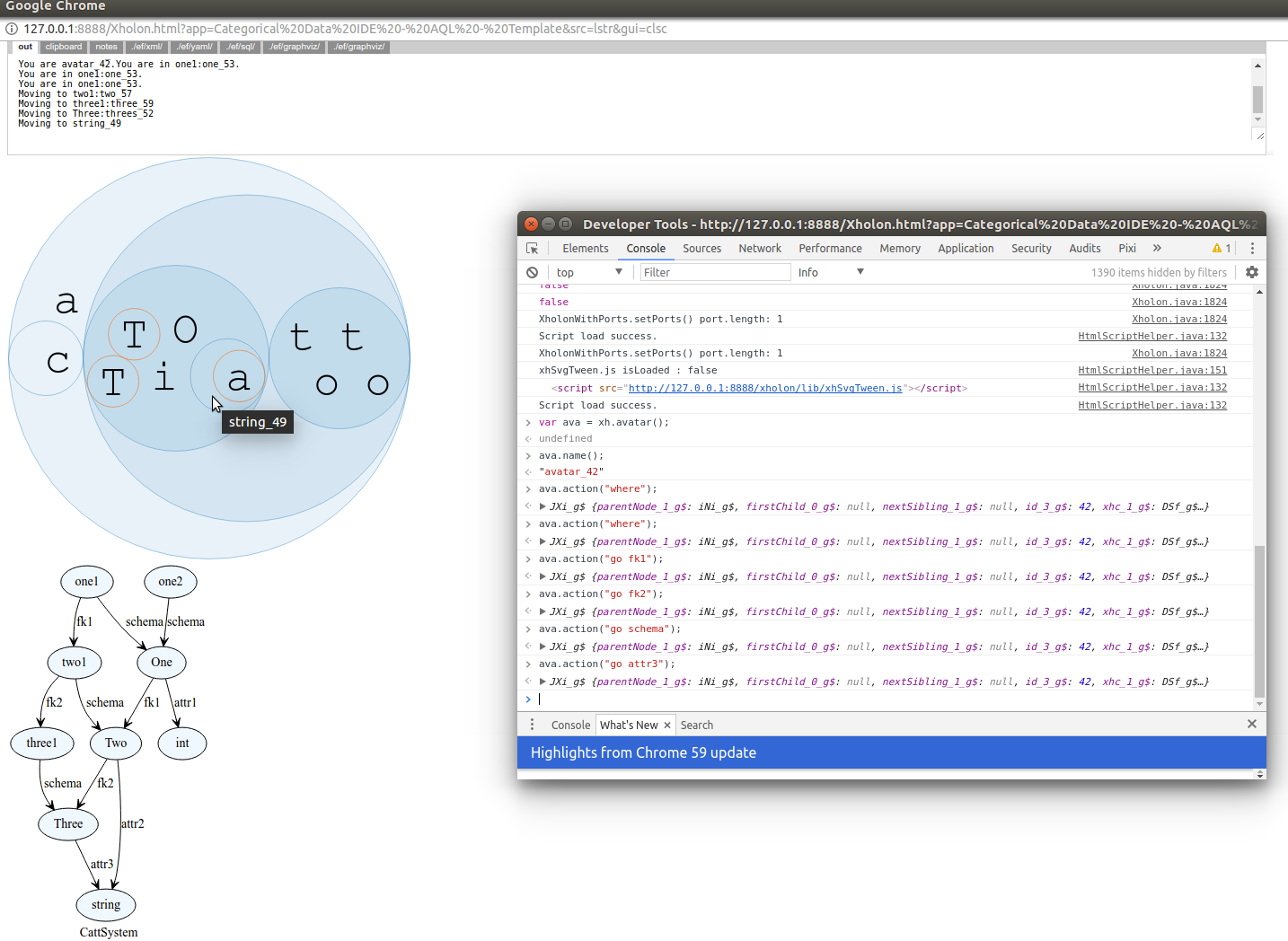
The following image shows a simple AQL example loaded into Xholon. Animation is running, and the system Avatar is being manually and visually moved through the AQL instances and schema. Note the use of Chrome Developer Tools to control the Avatar (ava). In the screenprint, the Avatar is currently inside the AQL "string" object. It got there by following the path from "one1": fk1 fk2 schema attr3
I've been trying out some concepts from Paweł Sobocinski's blog on Graphical Linear Algebra.
Xholon GWT is a Xholon project. Copyright (C) 2017-2025 Ken Webb
  @QWERTYUIk
  OPASmDFGHe
  primordion
  JKLZcXCVB.